

VNNIC Public DNS64
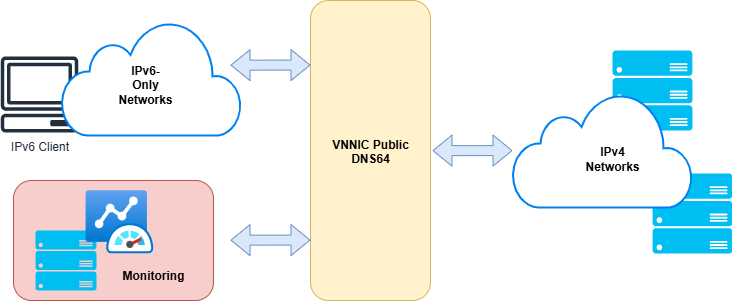
VNNIC Public DNS64 is a public DNS infrastructure platform developed by Viet Nam Internet Network Information Center (VNNIC) to support the transition and deployment of IPv6 only networks in Viet Nam. Designed under a modern DNS64 architecture, the platform is reliable and free to use, and aims to serve the Vietnamese Internet community in the IPv6 only era.
Benefits of DNS64
Free & Secure – Provides a free, reliable, and secure DNS64 platform for users.
IPv6-Only Support – Enables IPv6-only devices to easily access IPv4 services.
Promoting IPv6 Adoption – Contributes to the nationwide deployment of IPv6-only networks.
How to Configure DNS64 on Devices
The following guide explains how to configure and set up DNS64 on common devices and operating systems, allowing users to easily utilize the VNNIC Public DNS64 platform to connect from IPv6-only networks to IPv4 services.
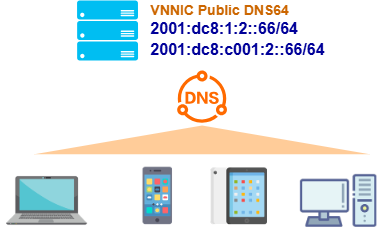
DNS64 Server Information
2001:dc8:1:2::66
2001:dc8:c001:2::66
Step-by-Step Guide to Configure DNS64 on Windows 10/11
Open Settings → Network & Internet.
Select your active connection (Wi-Fi or Ethernet).
Click Edit under DNS server assignment.
Choose Manual and turn on IPv6.
Enter the DNS64 addresses:
Preferred: 2001:dc8:1:2::66
Alternate: 2001:dc8:c001:2::66
Click Save to apply the settings.
How to Configure DNS64 on macOS
Open System Preferences → Network.
Select your current network connection.
Click Advanced....
Go to the DNS tab.
Add the following DNS64 addresses:
2001:dc8:1:2::66
2001:dc8:c001:2::66
Click OK, then Apply.
How to Configure DNS64 on Android Devices
Open Settings → Network & Internet.
Tap Wi-Fi and select your connected network.
Tap the Edit (pencil) icon.
Select Advanced options.
Change IP settings to Static.
Enter the DNS64 servers:
DNS 1: 2001:dc8:1:2::66
DNS 2: 2001:dc8:c001:2::66
Tap Save to apply the configuration.
How to Configure DNS64 on iOS (iPhone/iPad)
Go to Settings → Wi-Fi.
Tap the active network and select the (i) icon.
Under Configure DNS, choose Manual.
Remove existing DNS entries and add:
2001:dc8:1:2::66
2001:dc8:c001:2::66
Tap Save to confirm the settings.